On Tuesday evenings I lead a women’s Bible study at our church, and every week someone loses the passage. Last month we were reading Habakkuk, and a woman in her seventies thumbed past Nahum twice while the rest of us waited, apologizing the whole time. Her Bible had no tabs. Mine had sixty-six, put on years ago in a hurry, and half of them stood out past the cover and had been bent flat in my bag.

Bible tabs answer one question quickly: where does this book start. Done well, they let you open to a minor prophet with one hand while someone reads aloud. Done badly, they’re sixty-six small flags that curl, overlap and get crushed. Most of what’s written about them online is a product listing or a Facebook thread asking whether tabs should stick out past the cover, so this page shows the sets first and the planning after.
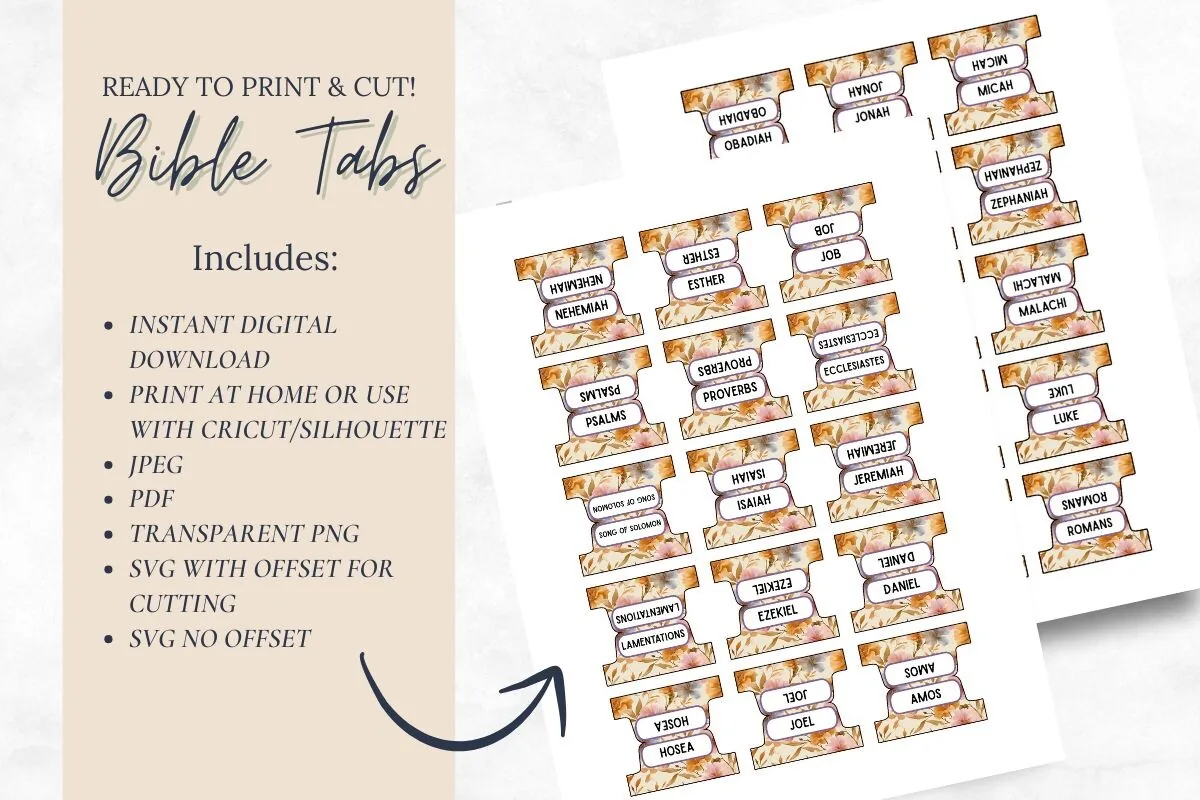
So I went looking for printable sets on Creative Fabrica, and this is the one I found first. What made me stop on its page: every book from Genesis to Revelation printed twice, once upside down, so each tab folds over the page edge instead of sticking to the printed text, with cut files for a Cricut or Silhouette.
01 / Best overall
Floral Bible Tabs DIY Scripture Tool
Designed by Softly Grounded.
 Best for fold-over tabs
- PDF, PNG, SVG, JPEG
- All books + 6 blank
- Print or cut
What’s insideBible tabs with the book names from Genesis to Revelation on a peach and blush watercolor floral background, plus six blank tabs, as a ready-to-print PDF, transparent PNGs, JPEGs and SVG files with and without an offset for Cricut or Silhouette. The previews show each name printed twice, one upside down, so the tab folds over the page edge.
- Every book named
- 6 blank tabs
- SVG with offset
- Fold-over layout
Why I picked it
A fold-over tab answers the ghosting problem covered further down: the glue goes on the tab, not on the printed page. This set is drawn that way, and the SVG files mean a cutting machine can do the sixty-six cuts for you.
Keep in mind: the files arrive as a PDF with a Google Drive link rather than a direct download, the tab size isn’t stated, and the full watercolor background uses a lot of color ink.
One fold-over set covers the whole Bible in one download. Tabbing has more than one style, though. Some women would rather print onto label sheets and peel, and some want a blank tab in a height that fits their own Bible.
So I kept looking, and here are my other two finds: a leopard-print set laid out for Avery 16280 label sheets, and a blank file-tab template in four heights from 1 to 2 inches. Before the list comes a table of the 66 books in their ten sections, the list every set is built from. After it: a comparison table, which type fits you and what I look for, then the planning guide: what to tab, how to space tabs with a ruler, where each one goes, thin paper, washi tape, fixing a crooked tab, printing tips and answers to common questions.
The 66 Books in 10 Sections: What a Tab Set Covers
Every Bible tab set starts from the same list. A Protestant Bible has 66 books, 39 in the Old Testament and 27 in the New, and they fall into ten traditional sections. Knowing the sections is what lets you choose between a tab for every book and a tab for each group.
Books of the Bible
Ten Sections, 66 Tabs
How many tabs each section needs.

| Section | Books | Tabs |
|---|---|---|
| Law | Genesis to Deuteronomy | 5 |
| History | Joshua to Esther | 12 |
| Poetry and Wisdom | Job to Song of Solomon | 5 |
| Major Prophets | Isaiah to Daniel | 5 |
| Minor Prophets | Hosea to Malachi | 12 |
| Gospels | Matthew to John | 4 |
| Church history | Acts | 1 |
| Paul’s letters | Romans to Philemon | 13 |
| General letters | Hebrews to Jude | 8 |
| Prophecy | Revelation | 1 |
Highlighted: short books close together, where tabs crowd most
39 + 27 = 66; a Catholic Bible has 73 books, so check your set
Those two highlighted rows are where the trouble starts. Twelve minor prophets and thirteen letters of Paul sit in thin slices of pages, so their tabs land close together and need the most careful spacing. If you want the whole list in order on one sheet, our books of the Bible printables have it.
The 3 Best Printable Bible Tab Sets I Found
Search “bible tabs” on Creative Fabrica and you get 43 results, but most are book interiors sized for Amazon publishing, digital paper packs, T-shirt designs or general file-tab templates, and “bible tab stickers” returns nothing. Several of the real Bible tab sets come from one designer and share one tab outline in different backgrounds, so I kept one of those rather than four. Each set below shows its sheets, and each is built a different way: fold-over, label sheet and blank template.
TL;DR: 3 printable Bible tab sets. A floral fold-over set with every book named and cut files for a cutting machine, a leopard-print set for all 66 books laid out on Avery 16280 label sheets, and a blank file-tab template in 1, 1.5, 1.75 and 2 inch heights that you label yourself.
Find your favorite
Quick Picks
Choose a set to jump to its review.
How I chose. In order of weight: tabs made for the books of the Bible, or a blank tab you can label yourself; previews that show the actual sheets; a stated format and a size or label sheet; and a construction that differs from the other picks. Everything below comes from each product’s page on Creative Fabrica, checked on November 11, 2026. I haven’t printed these myself, so I describe what each designer shows and lists.
02 / Best for label sheets
Leopard Bible Tabs File PDF Template
Designed by Softly Grounded.
 Best for ready-made tabs
- Avery 16280 labels
- 66 books
What’s insideBible tabs for all 66 books in a leopard print pattern with the names in a script font, laid out as a PDF to print on Avery 16280 labels.
- All 66 books
- Avery 16280 layout
- Leopard pattern
- Ready to print
Why I picked it
If you would rather not glue sixty-six small pieces, a label-sheet set is the shortcut: print, peel and place. It suits a Bible with thicker pages, where the adhesive is less likely to show through.
Keep in mind: it’s PDF only and not editable, the label adhesive sits on the page itself, and it comes from the same designer as the floral set. The same layout is also sold in a turquoise swirl colorway.
03 / Best blank template
File Tab Templates, Book Tab, Bible Tab
Designed by Gfx Shaown.
 Best for choosing your tab size
- Canva, SVG, PDF +2
- 1 to 2 in tabs
- 8.5 x 11 in
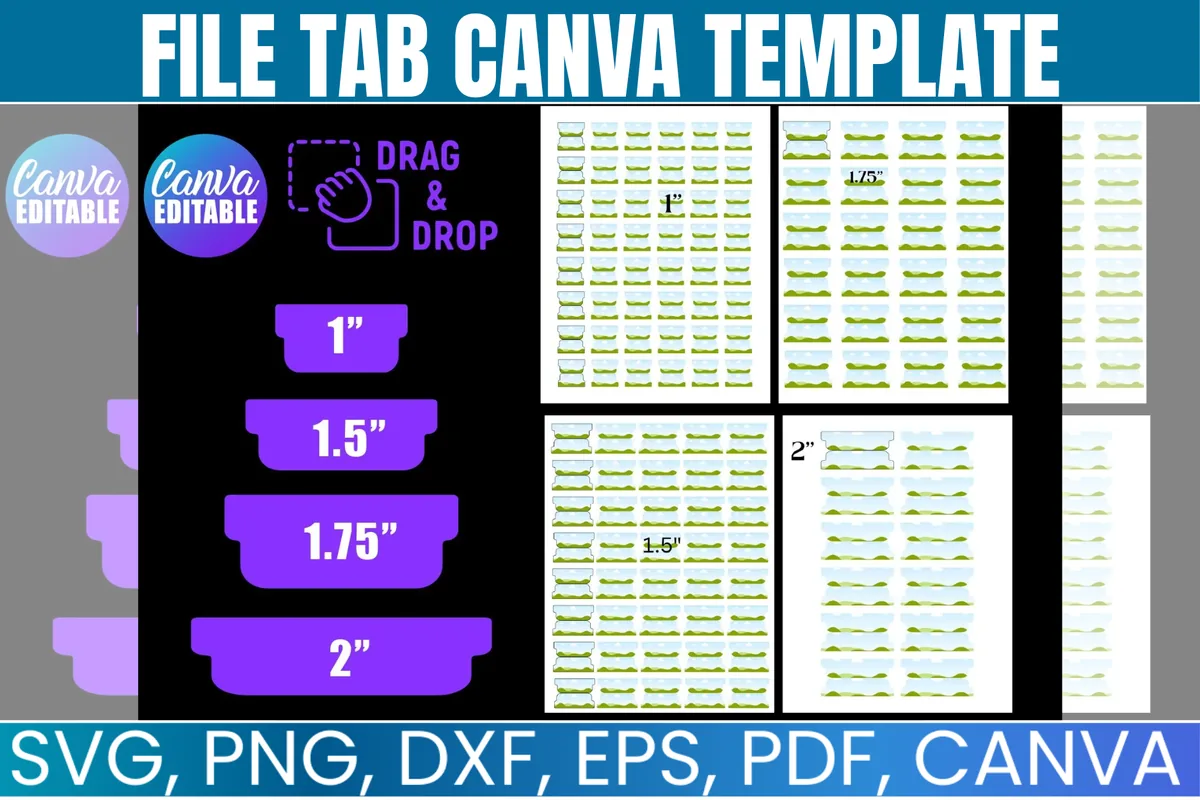
What’s insideBlank tab frames in four heights, 1, 1.5, 1.75 and 2 inches, laid out on 8.5 x 11 inch sheets, as an editable Canva template with SVG and DXF cut files, a transparent PNG and a PDF for printing. The tabs are blank, so you type the book names in yourself.
- Four tab heights
- 8.5 x 11 in sheets
- Editable in Canva
- SVG and DXF cut files
Why I picked it
This is the pick for anyone who works out the spacing with the four steps further down and finds the tab height matters. Choose the sheet whose height fits your spacing, add your own abbreviations, and print only the tabs you planned.
Keep in mind: it’s a general file-tab template rather than a Bible set, so no book names are included, every frame in the previews holds a placeholder picture, and you need Canva or a design program to add text.
Once your tabs are in, these Bible art journaling ideas help you fill the pages they mark.
Quick Comparison
| Printable | Type | What’s inside | Sizes / format | Standout |
|---|---|---|---|---|
| 1. Floral Bible Tabs DIY Scripture Tool | Fold-over tabs | Every book named, 6 blank tabs | Tab size not stated / PDF, PNG, JPEG, SVG | Cut files for Cricut or Silhouette |
| 2. Leopard Bible Tabs File PDF Template | Label-sheet tabs | All 66 books | Avery 16280 labels / PDF | Print, peel and place |
| 3. File Tab Templates, Book Tab, Bible Tab | Blank tab template | Blank tabs in four heights | 1 to 2 in on 8.5 x 11 in / Canva, SVG, DXF, PNG, PDF | You choose the tab height |
Fold-Over, Label Sheet or Blank Template: Which Fits You
Fold-Over Tabs for a Thin-Paper Bible
If your Bible has the thin, almost see-through paper most study Bibles use, start with the floral set. A fold-over tab is glued to itself around the page edge, so no adhesive sits on the printed text, and the cut files save you sixty-six rounds with scissors.
Label Sheets to Print, Peel and Place
If you’d rather not fold and glue, the leopard set prints onto Avery 16280 label sheets. It’s the quickest route from download to a tabbed Bible, and it suits a Bible with thicker pages, where adhesive is less likely to show through.
A Blank Template for Your Own Sizes
If you’ve measured your Bible and know the tab height you need, the blank template gives you four heights to choose from. You type the book names, or only the sections, yourself in Canva or a design program.
What I Look For in Printable Bible Tabs
- Every book named, or a true blank. A half set that stops at Malachi leaves you making the New Testament by hand.
- A stated size or label sheet. A tab is a measured object, so the listing should give the tab height or the label sheet it prints on.
- A fold-over shape for thin paper. The name printed twice, once upside down, means the tab wraps the page edge.
- Short names in large type. “1 Thessalonians” in tiny script is hard to read at arm’s length; standard abbreviations are fine.
- Ink you can afford. Sixty-six tabs on a full watercolor background use far more color ink than plain labels.
- Red flags in a listing. “6 x 9” with “ready to upload” means a book file for Amazon publishing, “digital paper” means backgrounds without tabs, and “PNG for shirts” means a craft graphic.
Deciding What to Tab
This is the decision most people skip, and it’s the one that decides whether the finished Bible is easy to use. Here are the three common approaches, built from the ten sections in the table above.
| Approach | Tabs | Good for |
|---|---|---|
| Every book | 66 | Group study, teaching, reading across the whole Bible |
| Old Testament by section, New Testament by book | 32 | Most readers; keeps the edge uncrowded |
| Only the books you open | 10 to 15 | A reading Bible you use for one plan at a time |
The middle approach gives the five Old Testament sections one tab each and tabs the 27 New Testament books one by one, which makes 32. It’s a compromise, and it’s the one the women in my group keep. Whichever you choose, write the list out before you cut anything, because finding out halfway through the Old Testament that sixty-six tabs won’t fit is a long way to come.
How to Space Bible Tabs in 4 Steps
No placement guide I found online explains the spacing, and it takes two minutes with a ruler. These are the four steps I’d follow before placing the first tab.
- Measure the page block. With the Bible closed, measure the pages from top to bottom, not the cover. Call that height H.
- Choose tabs per column. Decide how many tabs go in one column down the edge. Call that N. Most sets use two or three staggered columns.
- Divide. H divided by N is the centre-to-centre spacing. If H is 9 inches and you want 33 tabs in one column, the spacing is about a quarter of an inch, narrower than most printed tabs, which is why sets come in columns.
- Check the cover overhang. Measure how far the cover stands out past the pages. A tab that sticks out further than that gets crushed every time the Bible closes, the most common complaint about tabs, and it’s a measurement problem rather than a product problem.
Leave the top and bottom half inch of the page block empty too, because that’s where your thumb lands when you open the Bible.
Where a Tab Goes on the Page
On the first page of the book, not at a chapter. You find a book by its opening page, so the tab marks the start.

Keep each column in reading order, top to bottom, rather than alphabetical, or you undo the one advantage a Bible has over a dictionary. Old Testament tabs usually fill the first column or two and the New Testament starts a new one, so the labels don’t collide.
Line the tab up so the printed label clears the page edge by the amount you measured and no more. If it’s a fold-over design, fold it over the edge and press from the inside out so no air is trapped under the fold. Work in blocks of five and check the spacing against the ruler after each block, because tabs placed by eye drift, and a column that starts level at Genesis slopes by Deuteronomy.
Thin Paper, Ghosting and the Fold-Over Tab
Bible paper is thinner than anything else you own, and that causes two problems. The first is adhesive. A one-sided sticker tab puts glue on one page, and on thin paper that glue can show through as a gray shadow. A fold-over tab, printed with the label repeated front and back and glued to itself around the page edge, holds the page without putting adhesive on the printed area, and it’s stiffer, so it doesn’t curl.
The second is thickness. Sixty-six tabs add bulk at the page edge, and lamination adds more. A laminated tab lasts longer, but a Bible with sixty-six of them may not close flat, so for a study Bible that lives on a desk, laminate, and for one that goes in a bag, don’t. Test one tab on a book you rarely open, close the Bible, and check the page underneath the next day before you do the rest.
Washi Tape and Hand-Cut Tabs
You don’t have to print anything. Washi tape tabs are a length of tape about twice the depth you want, folded over the page edge and pressed, with the book name written on in fine permanent pen. They’re cheap, they come off cleanly, and they’re the easiest way to try a layout before committing to a printed set.
Hand-cut cardstock tabs are slower and sturdier: cut strips from card, fold them around the edge, glue and letter them by hand. If you already letter your own verse cards, you’ll probably like this version. Our Bible journaling for beginners guide covers which pens behave on thin paper, the same question you face here.
Fixing a Tab That Went On Crooked
Don’t pull. Bible paper tears before most adhesives give. Warm the tab gently first: a hairdryer on low for a few seconds, held well back, softens many adhesives enough to let the tab lift. Work from the outer corner inward, slowly, and stop if the paper starts to come up with it. If it won’t let go, leave it and cover it with a second tab trimmed to the same size, which looks deliberate and is the repair most people end up making.
With a fold-over tab the problem is usually the fold rather than the glue, and you can often reseat it by opening the fold before the glue sets, one more reason to place tabs in blocks of five rather than all at once.
How to Print Bible Tabs at Home
Print fold-over tabs on cardstock rather than paper. Around 200 gsm is stiff enough to survive a bag and thin enough to fold cleanly; heavier card can crack along the fold unless you score it first. Label-sheet sets like the leopard one go onto the label sheet they’re laid out for, here Avery 16280, and nothing else.
Set the printer to “Actual size”, never “Fit”. A tab set is a measured object, and a five percent scale change turns careful spacing into overlap by the time you reach the prophets. Print one row first, hold it against your Bible, then print the rest. Cut with a craft knife and a metal ruler rather than scissors, because hand-cut rectangles in a column show every uneven edge, and round the corners slightly if they catch. For the rest of the sheets in a study binder, see our Bible study printables.
A little help
Frequently asked questions
A few answers before you print.
How do you put Bible tabs on correctly?
Measure the page block height and the cover overhang first, work out your spacing, then place each tab on the first page of its book in blocks of five, checking against a ruler as you go. The tab should stick out past the pages by less than the cover overhang, so it isn’t crushed when the Bible closes.
Our set: Thirty-two tabs Two columns Two left blank
What is the correct placement for Bible tabs?
On the opening page of each book, in reading order down the outer edge, usually across two or three staggered columns because sixty-six tabs won’t fit in one. Keep the top and bottom half inch clear for your thumb.
Should Bible tabs stick out past the edge of the Bible?
Past the pages, yes, or you can’t see them. Past the cover, no. Measure how far the cover stands out past the page block and keep the tab shorter than that.
How many Bible tabs do I need?
Sixty-six for every book in a Protestant Bible, 32 if you give the five Old Testament sections one tab each and tab the New Testament books individually, or ten to fifteen for a reading Bible where you only tab the books you open.
Will Bible tabs damage thin pages?
Adhesive can show through thin paper, and pulling a tab off can tear it. A fold-over tab glued to itself around the page edge keeps adhesive off the printed area. Test one tab on a book you rarely open before doing the rest.
What paper should I print Bible tabs on?
Cardstock around 200 gsm for fold-over tabs, or the label sheet a set is laid out for, printed at actual size rather than fit to page. Heavier card needs scoring before it folds cleanly.
Can I make Bible tabs without printing?
Yes. Washi tape folded over the page edge and labeled with a fine permanent pen comes off cleanly, which makes it a good way to test a layout. Hand-cut cardstock tabs are sturdier and take hand lettering.
Final Thoughts
If I were tabbing a Bible this week, I’d print the floral fold-over set for a thin-paper study Bible, or the leopard label-sheet set for one with thicker pages, and spend ten minutes with a ruler before placing the first tab. Leave two blank tabs at the end of a column for the book your group studies next, and write the date inside the back cover so you know how long the set lasted. If the page edge is getting crowded, Bible inserts and Bible bookmarks hold notes and places without adding more tabs. If you’d like to know who is writing these lists, you can meet the three of us here.